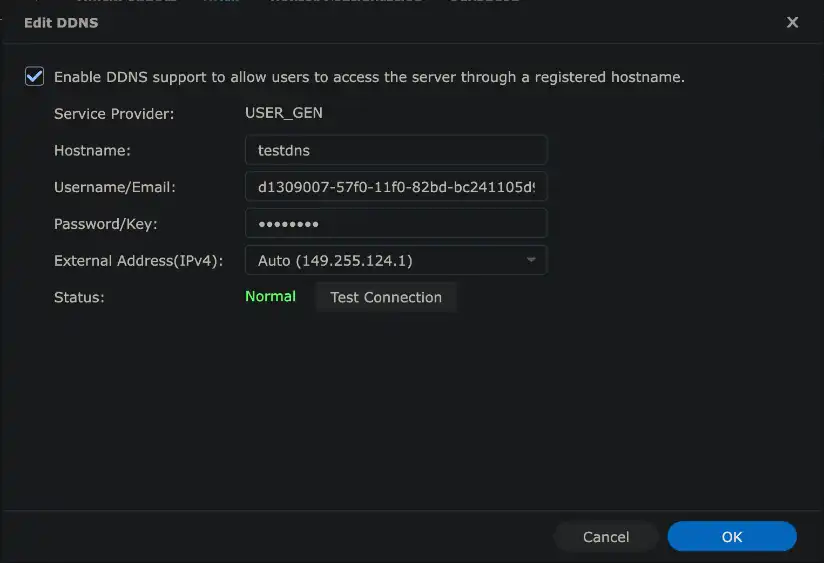
- Go to Control Panel, External Access, DDNS.
- Click Add, then Customize Provider.
- Set the service provider to GENDNS and the query URL to:
https://www.gendns.uk/dns?h=__HOSTNAME__&u=__USERNAME__&i=__MYIP__&p=__PASSWORD__ - Save the provider, then add a DDNS entry using it with your hostname, username and secret.
- Click Test Connection. The status should read Normal.
Documentation
Updating your records
Everything you need to point a client at GENDNS, from a single NAS to your own automation.
Before you start
To update a record you need three things from us:
- A hostname and zone, often
gendns.uk - A username
- A secret, which acts as the password
Your username and secret are tied to your GEN account, so that account must be active for GENDNS to work. Requests are rate limited, and addresses that abuse the service are blocked automatically.
Your IP address
Returns the public address we see you on, in whichever format suits your client. Use the f parameter to choose.
Plain text
https://www.gendns.uk/ip?f=text195.195.195.1JSON
https://www.gendns.uk/ip?f=json{"ip":"195.195.195.1"}XML
https://www.gendns.uk/ip?f=xml<?xml version="1.0" encoding="UTF-8"?>
<root><ip>195.195.195.1</ip></root>The update request
A single HTTPS GET updates your record. This is the URL every client on this page is built on.
https://www.gendns.uk/dns?h=testdns&u=123-123-123-123&i=195.195.195.1&p=q35yq35q3e5gq35gq35h&port=443| Parameter | Required | Description |
|---|---|---|
h | Yes | The hostname to update, without the zone. |
u | Yes | Your username. |
p | Yes | Your secret. |
i | No | The IP address to set. If omitted, we use the address the request came from. |
port | No | A service port, 1 to 65535. If omitted or invalid, it is stored as 0. |
Responses
The update request replies with a single line of plain text, compatible with the conventions most DDNS clients expect.
| Response | Meaning |
|---|---|
good 195.195.195.1 | The record was updated to the address shown. |
nochg | The address and port are unchanged, so nothing was done. |
nohost | The hostname and secret do not match an active record. |
dnserr | The update was accepted but could not be applied. Try again shortly, and raise a ticket if it persists. |
fail-0 | A required parameter (h, u or p) is missing. |
Synology
ddclient
Add the following to your ddclient.conf, replacing your_username, your_password and testdns with your own values.
protocol=dyndns2
use=web, web=https://www.gendns.uk/ip?f=text
server=www.gendns.uk
ssl=yes
login=your_username
password=your_password
testdns
Programmatic DNS
For high availability, failover and automation, GENDNS offers an API for managing zones and records directly.
| Endpoint | Purpose |
|---|---|
getZone | Retrieve information about a DNS zone. |
putZone | Create or update a DNS zone. |
getRR | Retrieve a specific resource record. |
putRR | Create or update a resource record. |
Example request
curl -X GET "https://api.gendns.uk/v1/getZone?zone=example.com&u=username&p=secret"Replace username and secret with your own credentials. API access is enabled on request: contact us or raise a ticket with support, and we will send the full reference for each endpoint, including parameters and response formats.